 YTMP4
YTMP4 – YouTube to MP4 Converter
Paste a YouTube link, choose a quality, download. MP4 up to 1080p HD and MP3 audio, free and without signing up.
Works with videos, Shorts and youtu.be links · No app · No account
Links stay valid for a few hours.
What YTMP4 does, in plain words
YTMP4 takes a YouTube link and gives you back a normal video file. That's the whole idea. You paste the address of a video, the page asks YouTube which versions of that video exist, and you get a short list: 1080p, 720p, 480p, 360p and an audio-only MP3. Tap the one you want and your browser saves it like any other download.
There's no program to install and nothing to sign up for. The converter works the same way in Chrome on an old Android phone, in Safari on an iPhone, and in Edge or Firefox on a laptop. We built it because most "free" downloaders we tried had three fake Download buttons, a forced app install, or a quality list that promised 1080p and delivered something blurry. YTMP4 shows you exactly what the video has, with the approximate file size next to each option, so you know what you're getting before the download starts.
The file you get is an MP4: the most common video format there is. It opens in the gallery on Android, in Photos on iPhone, in VLC, in Windows Media Player, in QuickTime, in video editors and on smart TVs from a USB stick. You don't need a special player and you don't need to convert it a second time.
If you'd rather use a version of this tool in your own language, the original YTMP4 converter runs in 13 languages, including Spanish, Portuguese, Indonesian, Hindi and Arabic. This page is the lightweight English edition, kept fast and simple.
How to convert YouTube to MP4 with YTMP4
- Copy the link. In the YouTube app, tap Share under the video and choose Copy link. On a computer, click the address bar and copy the URL. Links that start with youtube.com/watch, youtu.be or youtube.com/shorts all work.
- Paste it above. Tap the box at the top of this page. On most phones the Paste button fills it in for you and starts right away. Otherwise long-press the box, paste, and press Convert.
- Pick a quality and download. After a few seconds you'll see the video title, the thumbnail and every available format. Tap Download next to the one you want. The best quality is listed first and highlighted.
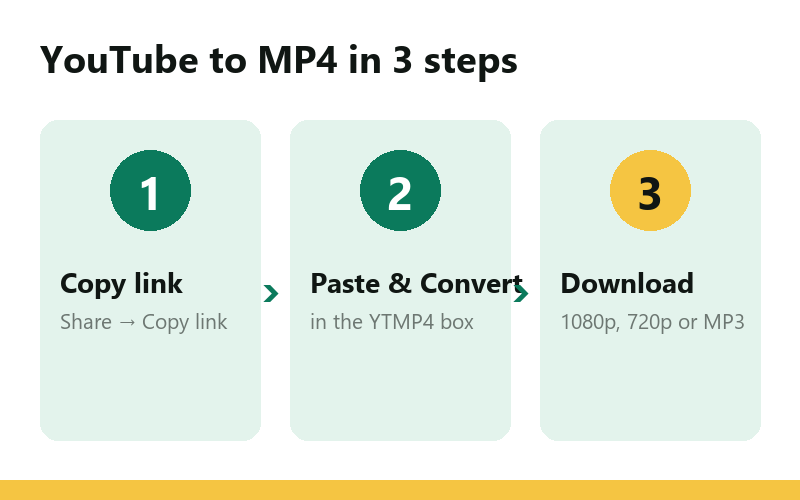
A few details that save time. The download links stay valid for a few hours, so you can convert a video now and save a second quality later without starting over, as long as you keep the page open. If you have a playlist link with a single video in it (the address contains both v= and list=), YTMP4 takes the video you were watching and ignores the list. And if you paste a link from the mobile site (m.youtube.com) or with a timestamp like &t=95s, that's fine too: the page cleans it up for you.
Which quality should you choose?
Bigger isn't always better. A 1080p file looks great on a TV but is wasted on a phone screen if you're short on storage. Here's a quick guide based on a typical ten-minute video:
| Quality | Best for | Size (10 minutes) |
|---|---|---|
| 1080p (Full HD) | TV, laptop, editing, presentations | about 120–250 MB |
| 720p (HD) | Phones and tablets | about 60–120 MB |
| 480p | Saving storage, long lectures | about 35–60 MB |
| 360p | Slow connections, old phones | about 20–40 MB |
| MP3 audio | Music, podcasts, talks | about 8–10 MB |
1080p is the right pick when you'll watch on a big screen, cut clips in an editor, or show the video in a classroom or meeting. Text on slides and code in tutorials stays sharp. 720p is the sweet spot for phones: on a six-inch screen it's very hard to tell apart from 1080p, and the file is roughly half the size. 480p works well for lectures, podcasts with a static camera and anything where the picture matters less than the sound. 360p is for when you're on mobile data or need a file small enough to send in a chat app.
Some videos also offer 1440p or 4K. YTMP4 lists them when they exist. These files are large, and many phones can't play 4K smoothly, so only choose them if you have a screen that shows the difference.
Sizes in the list are estimates from YouTube's own data. Videos with a lot of motion (sports, games, concerts) come out bigger than a person talking in front of a wall at the same resolution, because there's more changing in every frame.
Downloading YouTube videos on Android
Android is the easiest. Open YTMP4 in Chrome (or Samsung Internet, Firefox, Brave or Opera), convert the video and tap Download. A bar at the bottom shows the progress. When it finishes, the video is in the Download folder, and after a few seconds it also shows up in your Gallery or Google Photos under "Downloads".
If nothing seems to happen when you tap Download, pull down the notification shade: the download may be running there. If the browser asks whether to keep the file, tap Download or Keep. That warning appears for many video files and doesn't mean anything is wrong.
Tip: to come back faster next time, open the browser menu and choose Add to Home screen. You'll get a YTMP4 icon that opens this page directly. Then sharing a video is three taps: Share → Copy link in YouTube, open YTMP4, tap Paste.
Downloading on iPhone and iPad
On iOS, use Safari. Chrome on iPhone works too, but Safari handles downloads most reliably. After converting, tap Download. Safari may ask "Do you want to download…?" Tap Download again. A small blue arrow appears at the top of the screen with the progress.
When the download finishes, the video is in the Files app, under On My iPhone → Downloads (or iCloud Drive → Downloads, depending on your settings). Videos in Files don't show up in the Photos app automatically. To move it there, open the video in Files, tap the Share button and choose Save Video. Now it's in your camera roll and you can trim it, send it on WhatsApp or post it like any other clip.
If Safari says the download failed, check that you have enough free storage. A 1080p video of a long concert can easily be over a gigabyte. Picking 720p usually fixes it.
On Windows, Mac, Linux and Chromebook
On a computer, any modern browser works. The file goes to your usual Downloads folder and is named after the video title, so you can find it without hunting through random file names. Double-click it and it plays in the default video app. If you edit videos, the MP4 drops straight into Premiere Pro, DaVinci Resolve, CapCut, iMovie, Shotcut or Clipchamp without converting.
On a Chromebook, the file lands in My files → Downloads and plays in the built-in Gallery app.
YouTube Shorts to MP4
Shorts work exactly like regular videos. Open the Short, tap Share → Copy link, and paste the link into YTMP4. You get a vertical MP4, usually at 1080×1920, the same shape as the original. That makes it easy to keep a Short you liked, use it as a reaction clip, or watch it again offline. Because Shorts are under a minute, the files are small, usually just a few megabytes even in full HD.
YouTube to MP3 on the same page
Sometimes you only want the sound: a song, a podcast episode, a sermon, a language lesson, a speech. After converting, switch to the MP3 audio tab. You'll see two options. MP3 plays everywhere, including old MP3 players, car stereos and every phone. M4A is the original audio track that YouTube streams; it's a little smaller at the same quality and plays on all phones and computers, but some older devices don't recognize it.
Audio files are tiny compared to video: an hour of MP3 is roughly 60–90 MB, while the same hour in 1080p video can be over a gigabyte. If you listen on the bus or at the gym, audio is the smarter download. If you mostly convert music, the dedicated YouTube to MP3 converter is set up for that, with the audio tab opened first.
Why a video might not convert
Most public videos convert in a few seconds. When one doesn't, it's almost always one of these reasons:
- The video is private or unlisted with restrictions. If you can't watch it without being logged in to a specific account, the converter can't read it either.
- It's age-restricted. YouTube requires sign-in for these videos, so they can't be downloaded without an account.
- It's members-only or a paid video. Channel memberships, YouTube Premium-only content and rented movies are protected.
- It's a live stream that's still running. Wait until the stream ends and YouTube finishes processing it, then try again.
- It's blocked in some countries. Region-locked videos sometimes fail.
- It was removed. Deleted videos and videos taken down for copyright are gone for good.
- The link is incomplete. If you copied only part of the address, the page can't find the video. Copy it again with Share → Copy link.
Very rarely, YouTube is slow to answer and you'll see a "try again" message. Wait half a minute and convert again; it usually goes through on the second try. If one particular video never works but others do, the problem is with that video, not with your phone or connection.
If a download starts but stops halfway, it's usually the connection. Switch from mobile data to Wi-Fi, or choose a smaller quality. Keep the screen on while a big file downloads on a phone, because some phones pause downloads when they go to sleep.
Is YTMP4 safe to use?
Yes, and here's specifically why. You never install anything: YTMP4 is a web page, so there's no app with permissions on your phone and no browser extension reading your tabs. You don't create an account and you don't give us your email, so there's nothing to leak. The files you download are plain MP4 and MP3 media files, not programs. A video file can't run code on your device.
The site is paid for by a small number of ads: a banner, a box under the results on some visits and a native ad block further down. We deliberately don't use pop-ups, pop-unders, fake "Download" buttons or redirect ads, because those are what make most downloader sites miserable. The real download buttons are always the green ones inside the result card. Our privacy policy explains exactly what is and isn't stored.
Why MP4?
MP4 is a container that holds video and audio together in one file. Inside, YTMP4 gives you H.264 video with AAC audio whenever YouTube offers it, which is the combination that every phone, computer, browser and TV can play without extra software. Other formats like WebM or MKV can look identical, but they trip up iPhones, some smart TVs and a lot of editing apps. With MP4 you skip all of that.
Tips for keeping your downloads organized
If you download a lot, a couple of habits help. Make a folder per topic (one for lectures, one for recipes, one for workouts) and move files there right after downloading. Delete what you've finished watching: a phone fills up quickly with HD video. For long courses, choose 480p; you'll fit five times as many lessons in the same space. And if you only listen, take the MP3 instead of the video.
YTMP4 vs. other ways to save a video
There are a few other ways people try to keep a YouTube video, and each has a catch.
Screen recording. Every phone can record its screen, so it seems like the obvious answer. In practice the result is worse: notifications pop up in the middle, the status bar and player buttons end up in the frame, the sound is re-recorded and often quieter, and you have to sit through the whole video in real time. A 40-minute lecture takes 40 minutes to record. With YTMP4 the same lecture downloads in a minute or two, in the original picture quality, with clean sound.
YouTube's own Download button. The official offline feature in the app is fine for a quick flight, but the video stays locked inside the YouTube app. You can't move it to your laptop, play it on a TV from a USB stick, open it in an editor or send it to a friend. It also disappears if you don't reconnect to the internet for a while, and for most features you need a Premium subscription. An MP4 from YTMP4 is a normal file you control.
Desktop programs and browser extensions. Some work well, but you have to install them, keep them updated and trust them with your computer. Extensions in particular can read every page you visit. YTMP4 needs none of that; close the tab and it's gone.
Other converter sites. Many are fine, but the common problems are fake download buttons, pop-up windows, forced app installs on Android, and files that are much lower quality than advertised. We try hard to avoid all four.
What people use YTMP4 for
Looking at the questions we get, a few uses come up again and again:
- Studying. Students save lectures, exam walkthroughs and language lessons to watch on the commute or in places with bad signal. Downloading a course once and watching it many times also saves a lot of mobile data.
- Teaching and presenting. Teachers and trainers download a short clip to play in class or in a meeting, so they don't depend on the room's Wi-Fi or have an ad start in front of the audience.
- Travel. Before a long flight, a train ride or a trip somewhere with expensive roaming, people save a few films' worth of videos, cooking shows or kids' cartoons.
- Creators backing up their own work. If you've lost the original file of something you uploaded years ago, YTMP4 gets you a copy back from your own channel.
- Editing. Video editors pull Creative Commons footage, public-domain clips or their own uploads into an editing project, where an MP4 is the easiest format to work with.
- Music and podcasts. With the MP3 tab, people keep talks, sermons, mixes and podcast episodes for listening offline.
Common mistakes to avoid
Downloading 4K for a phone. It looks no better on a small screen and fills your storage four times as fast. Take 720p or 1080p.
Tapping ads instead of the result. On any free website, the download you want is the one inside the result card, next to the quality you picked. On YTMP4 those buttons are green and say Download.
Closing the page during a big download on iPhone. On iOS, keep Safari open until the blue progress arrow finishes; leaving the app can pause or cancel a large file.
Copying the wrong link. Copying the address of a channel page, a search result or your subscriptions feed won't work. Open the video itself first, then use Share → Copy link.
A note on using downloads fairly
Downloading is great for watching offline, studying, and keeping your own uploads. It's not permission to re-upload other people's work. Save your own videos, videos released under Creative Commons, public-domain material, and anything the creator says you may keep. Don't re-post someone else's content as your own or use it commercially without permission: that breaks YouTube's terms and copyright law, and it hurts the people who made the video. If you love a channel, the best thing you can still do is watch, like and subscribe on YouTube.
YTMP4 doesn't host or keep copies of any video. Files are prepared on request and deleted shortly afterwards. If you're a rights holder with a concern, see our copyright page.
Want the full-featured version? YouTube to MP4 on ytmp4.store adds search by video name, playlist support and pages in 13 languages, all with the same simple layout.
Frequently asked questions
Is YTMP4 free?
Yes. Every quality, MP4 and MP3, is free. There is no account, no app and no daily limit for normal use. The site is paid for by a few ads that stay out of the way.
What is the best quality I can download?
YTMP4 lists every quality the video was uploaded in, usually up to 1080p and sometimes 1440p or 4K. The best one is always shown first.
Does YTMP4 work on iPhone?
Yes. Open the page in Safari, convert the video and tap Download. iOS saves it in Files under Downloads, and from there you can save it to Photos.
Can I download only the audio?
Yes. After converting, open the MP3 audio tab and pick MP3 or M4A.
Do YouTube Shorts work?
Yes. Paste a youtube.com/shorts link the same way as a normal video. It downloads as a vertical MP4.
Where are my downloads saved?
In your browser's normal download folder: Download on Android, Files > Downloads on iPhone and Downloads on a computer.
Why does a video say it can't be converted?
Private, members-only, age-restricted, region-locked and live videos can't be read. Removed videos can't either. Try a different public video to check that the tool works.
Is there a length limit?
There is no fixed limit, but very long videos in 1080p make large files. For lectures and podcasts longer than two hours, 480p or MP3 is the practical choice.
Do I need to install anything?
No. YTMP4 runs in the browser. Never install an app or extension that a download page asks you to install; YTMP4 never asks.
Is YTMP4 connected to YouTube?
No. YTMP4 is an independent tool and is not affiliated with, endorsed by or sponsored by YouTube or Google.